|
 Languages Languages
So far, Cenon has an English and a German user interface. Recently a Danish Interface (thank's to Erik Richard Sørensen) and now a French Interface (thank's to Migiel Saro) has been added. If you need another language and have the language skills, you can translate the language files of Cenon with little effort. Your translation could be part of the next version of Cenon to the benefit of other users. Of course, the translaters name will be mentioned.
Step-by-Step:
To translate the Cenon user interface all you have to translate resides inside the language folders within the Cenon.app application bundle.
Inside the Cenon.app bundle, you will find a folder "Resources" (or "Contents/Resources"). The resource folder contains all the language folders named LANGUAGE.lproj.
The files in this folder may not be editable, that's why you can download them here: (Cenon Language Files).
- Duplicate the language folder of the English language (plus German string-files for the English ones are incomplete!)
- Rename the copied folder to the name of the language you are creating, for example:
| Language |
Folder name |
Translator |
| Danish |
Danish.lproj |
Erik Richard Sørensen |
| Dutch |
Dutch.lproj |
| French |
French.lproj |
Miguel Saro |
| Hungarian |
Hungarian.lproj |
| Italian |
Italian.lproj |
| Portuguese |
Portuguese.lproj |
| Romanian |
Romanian.lproj |
| Spanish |
Spanish.lproj |
-
NIB/XIB - Files
|
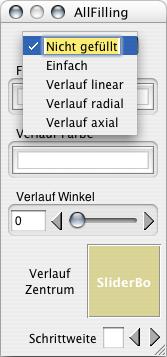
Mac: All files with the extension '.nib' or 'xib' can be openend with the InterfaceBuilder or ILocalize.app with a double click.
In the InterfaceBuilder you can translate all texts as shwon in the example (double click on the text).
GNUstep: files with the extension '.nib' can be imported and edited with the interface modeler Gorm.
Here you can translate all the texts (double click on the text). The file will be saved with the extension '.gorm'. You can remove the loaded '.gmodel' by hand (both gorm and gmodel format are compatible with Cenon).
All other parts (connections, settings) must remain as they are.
|
 |
-
Strings
All files with the extension 'strings' can be translated using a text editor. The part on the right side of the equal sign needs to be changed. The left side must remain in English!
"Turn Grid Off" = "Gitter abschalten";
-
Language folders for Cenon.app reside at the following locations:
| Bundle |
Path |
| Cenon.app |
/Applications/Cenon.app/[Contents/]Resources/LANG.lproj |
| Export.prefs |
Resources/Export.prefs/Resources/LANG.lproj |
| Import.prefs |
Resources/Import.prefs/Resources/LANG.lproj |
| General.prefs |
Resources/General.prefs/Resources/LANG.lproj |
| MODULE.bundle |
/Library/Bundles/Cenon/MODULE.bundle/[Contents/]Resources/LANG.lproj |
LANG is a wildcard for the language
MODULE is a wildcard for the module name (ex 'Astro')
|
|
Packages for other Platforms
So far we are able to prepare packages for Apple, and with some delay also for SuSE Linux.
Debian packages are prepared by Debian and are missing the Graphics Library.
If you are at home on a distribution we cannot provide, we are happy to add your binaries to our download server.
|
|
Cenon with GNUstep / Linux
Cenon with the GNUstep libraries (needed for Linux and other Unix-Derivatives) constantly creates new challenges. Changes in GNustep often break functionality with Cenon and demand for a fix in GNustep or a workaround in Cenon.
In general the GNUstep project needs support and people who help the project to become better, more usable and also more attractive. Using applications like Cenon with GNUstep automatically uncovers glitches. What both projects need are people who hunt down these issues. This not only helps Cenon to run better on Linux but also any other application for GNUstep.
|